> ## Documentation Index
> Fetch the complete documentation index at: https://turnkey-0e7c1f5b-traian-remove-eip-712-note.mintlify.site/llms.txt
> Use this file to discover all available pages before exploring further.
# Import wallets
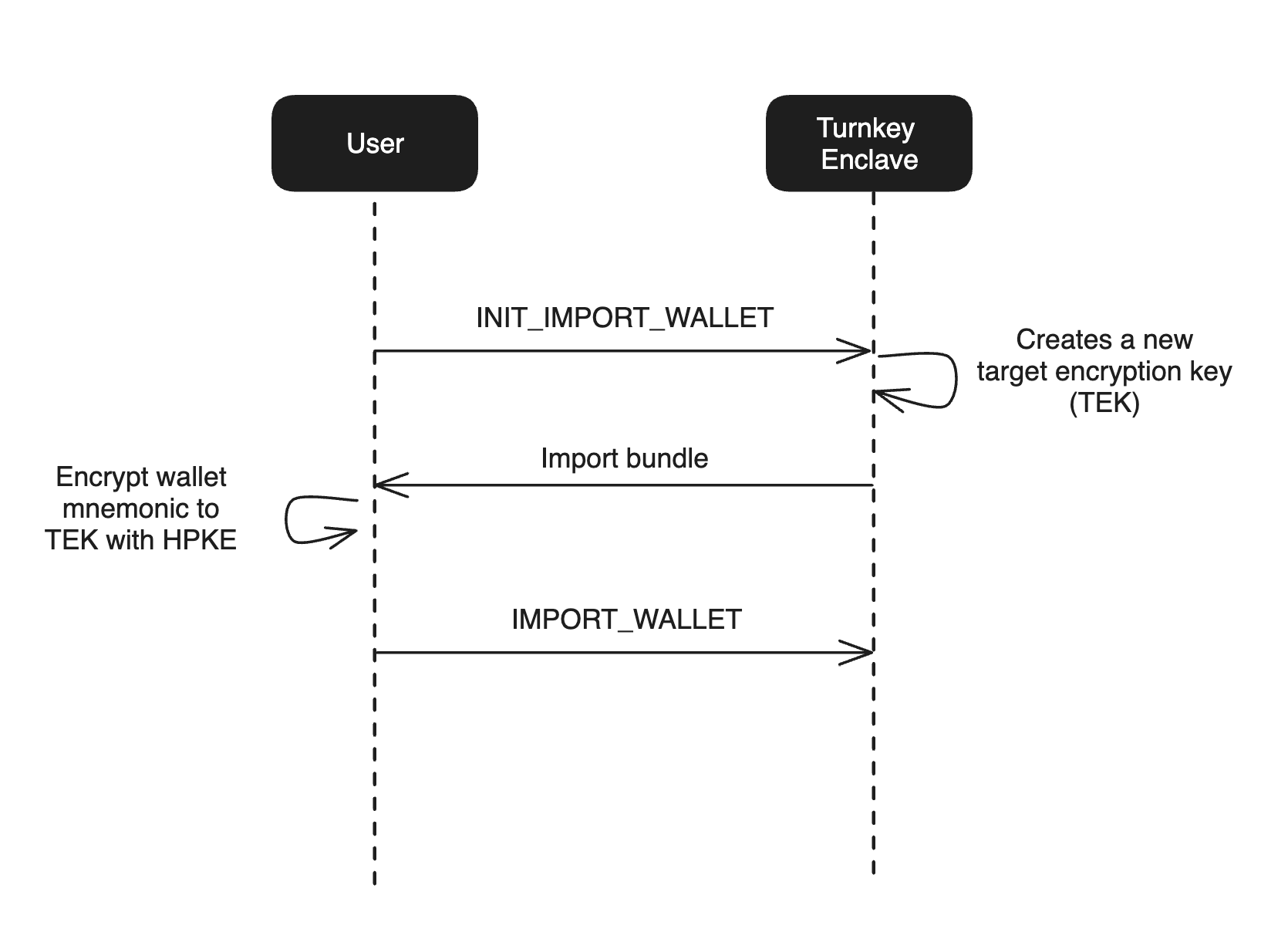
The process of importing wallets or private keys into Turnkey is broken up into three primary steps,
which together ensure key material cannot be compromised on its way to Turnkey:
Initialize the import process. Turnkey creates and returns a secure bundle, which includes a
target encryption key (TEK).
Encrypt the wallet or private key to the TEK from the previous step.
Send the resulting bundle to Turnkey. Turnkey decrypts the bundle in secure enclave where the
wallet or private key will reside long-term.
## How it works
Turnkey imports are powered by a **target encryption key** (TEK) — a standard P-256 key pair
generated inside the Turnkey secure enclave when you call the `INIT_IMPORT_WALLET` or
`INIT_IMPORT_PRIVATE_KEY` activity. The TEK public key is returned in the activity response and
signed by the enclave's quorum key, so the client can verify it is encrypting to a genuine Turnkey
enclave and not a man-in-the-middle.
The client encrypts the wallet mnemonic or private key to the TEK public key before it leaves the
user's device. The encrypted bundle is then submitted in an `IMPORT_WALLET` or `IMPORT_PRIVATE_KEY`
activity, where the enclave uses its TEK private key to decrypt and store the key material. Neither
Turnkey nor your application ever sees the plaintext.
 For full protocol details, see
[Enclave to end-user secure channel](/security/enclave-secure-channels).
## Implementation guides
### Client side SDKs
Each client SDK integration guide covers wallet and private key import end-to-end, including
initializing the import, encrypting key material, and completing the activity:
* [React](/solutions/embedded-wallets/integration-guide/react/using-embedded-wallets#importing-and-exporting-wallets)
* [React Native](/solutions/embedded-wallets/integration-guide/react-native/using-embedded-wallets#import)
* [Flutter](/solutions/embedded-wallets/integration-guide/flutter/using-embedded-wallets#importing-wallets)
* [Swift](/solutions/embedded-wallets/integration-guide/swift/using-embedded-wallets#importing)
* [Kotlin](/solutions/embedded-wallets/integration-guide/kotlin/using-embedded-wallets#import)
### Server side SDK
Use [`@turnkey/sdk-server`](https://www.npmjs.com/package/@turnkey/sdk-server) together with
[`@turnkey/crypto`](https://www.npmjs.com/package/@turnkey/crypto) to drive import flows from a
Node.js backend. The server initializes the import activity to receive the TEK, `@turnkey/crypto`
encrypts the key material to the TEK, and the server completes the import.
A full reference implementation is available at
[import-in-node](https://github.com/tkhq/sdk/tree/main/examples/key-management/import-in-node).
### Embedded iframe
Turnkey hosts a static import page at `import.turnkey.com` designed to be embedded as an iframe in
your app. The iframe handles encryption of the mnemonic or private key entirely within its own
origin — neither your app nor Turnkey ever sees the plaintext. Use
[`@turnkey/iframe-stamper`](https://www.npmjs.com/package/@turnkey/iframe-stamper) to insert the
iframe, inject the import bundle, and extract the encrypted result. Source code for the hosted page
is available at [tkhq/frames](https://github.com/tkhq/frames).
For a full reference implementation, see the
[import-export-with-iframe-stamper](https://github.com/tkhq/sdk/tree/main/examples/key-management/import-export-with-iframe-stamper)
example.
For full protocol details, see
[Enclave to end-user secure channel](/security/enclave-secure-channels).
## Implementation guides
### Client side SDKs
Each client SDK integration guide covers wallet and private key import end-to-end, including
initializing the import, encrypting key material, and completing the activity:
* [React](/solutions/embedded-wallets/integration-guide/react/using-embedded-wallets#importing-and-exporting-wallets)
* [React Native](/solutions/embedded-wallets/integration-guide/react-native/using-embedded-wallets#import)
* [Flutter](/solutions/embedded-wallets/integration-guide/flutter/using-embedded-wallets#importing-wallets)
* [Swift](/solutions/embedded-wallets/integration-guide/swift/using-embedded-wallets#importing)
* [Kotlin](/solutions/embedded-wallets/integration-guide/kotlin/using-embedded-wallets#import)
### Server side SDK
Use [`@turnkey/sdk-server`](https://www.npmjs.com/package/@turnkey/sdk-server) together with
[`@turnkey/crypto`](https://www.npmjs.com/package/@turnkey/crypto) to drive import flows from a
Node.js backend. The server initializes the import activity to receive the TEK, `@turnkey/crypto`
encrypts the key material to the TEK, and the server completes the import.
A full reference implementation is available at
[import-in-node](https://github.com/tkhq/sdk/tree/main/examples/key-management/import-in-node).
### Embedded iframe
Turnkey hosts a static import page at `import.turnkey.com` designed to be embedded as an iframe in
your app. The iframe handles encryption of the mnemonic or private key entirely within its own
origin — neither your app nor Turnkey ever sees the plaintext. Use
[`@turnkey/iframe-stamper`](https://www.npmjs.com/package/@turnkey/iframe-stamper) to insert the
iframe, inject the import bundle, and extract the encrypted result. Source code for the hosted page
is available at [tkhq/frames](https://github.com/tkhq/frames).
For a full reference implementation, see the
[import-export-with-iframe-stamper](https://github.com/tkhq/sdk/tree/main/examples/key-management/import-export-with-iframe-stamper)
example.