> ## Documentation Index
> Fetch the complete documentation index at: https://turnkey-0e7c1f5b-traian-remove-eip-712-note.mintlify.site/llms.txt
> Use this file to discover all available pages before exploring further.
# Getting started with Turnkey's Flutter SDK
> Learn how to setup Turnkey's Flutter SDK into your application. This guide walks you through enabling Turnkey's Auth Proxy, installing the SDK, and configuring the provider.
## Turnkey organization setup
To start, you must create a Turnkey organization via the [Turnkey dashboard](https://app.turnkey.com). The steps to do so are described in the [Account Setup](/get-started/quickstart) section.
For this setup, we will be using Turnkey's Auth Proxy to handle authentication. We can enable and configure this through the Turnkey dashboard.
Navigate to the **Embedded Wallets → Configuration** section in the Turnkey Dashboard and enable the
**Auth Proxy**.
 You can choose which auth methods to enable and customize various options from this screen. For this quickstart, let's enable **email OTP** and **passkeys**. When you're done, click **Save**.
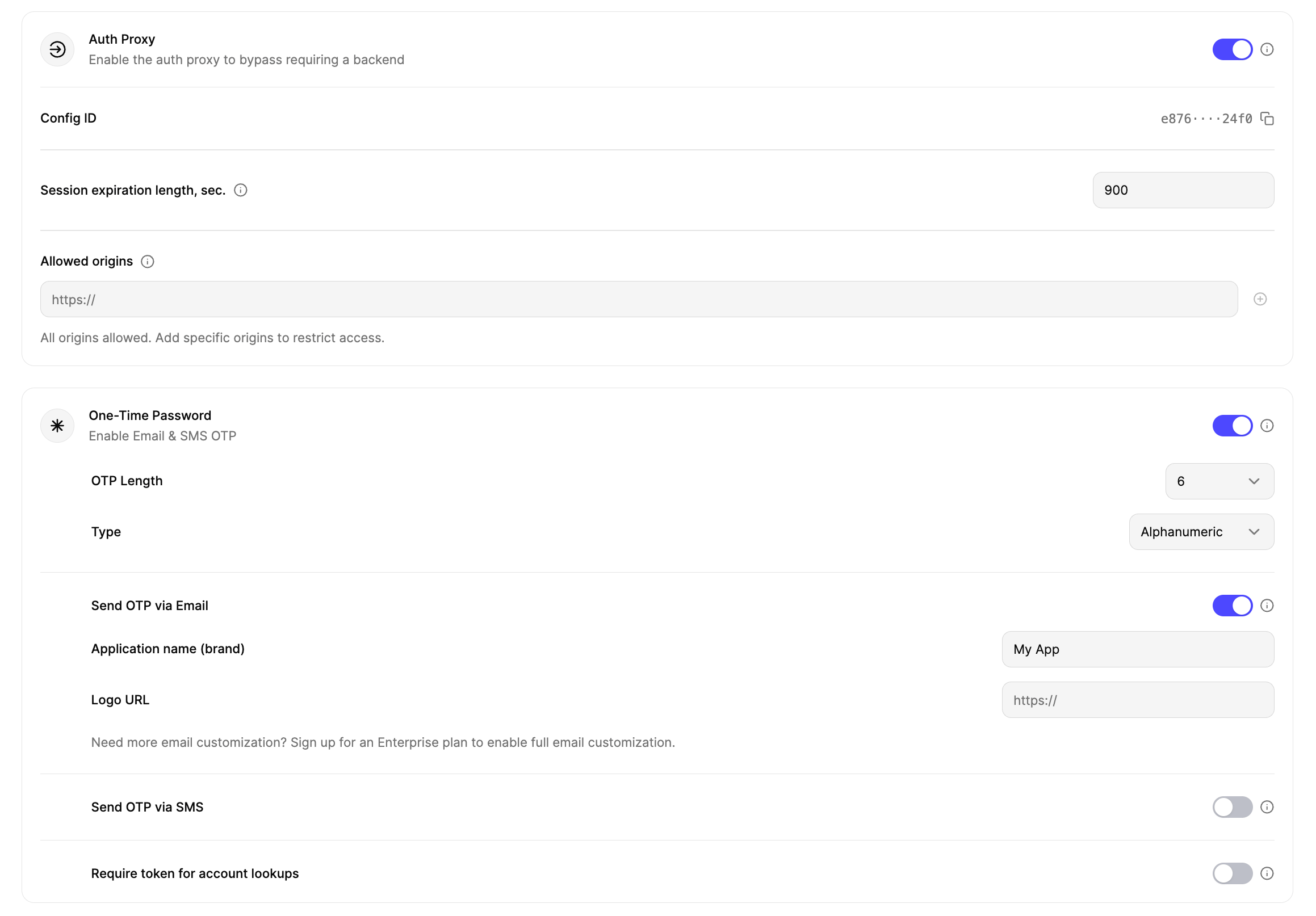
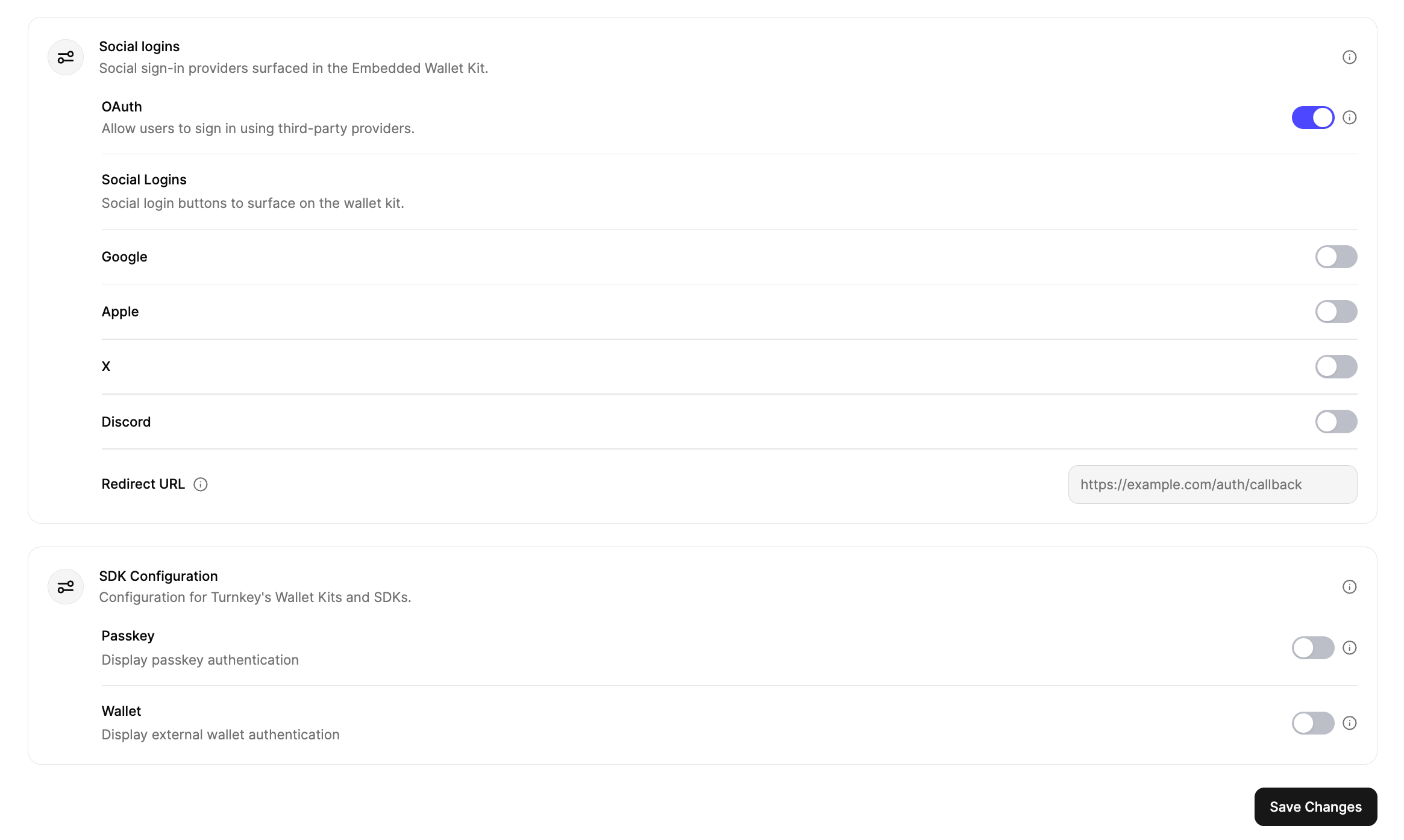 Once you're finished with the auth proxy setup, you can copy the **auth proxy config ID**
 and your **organization ID** from the dashboard.
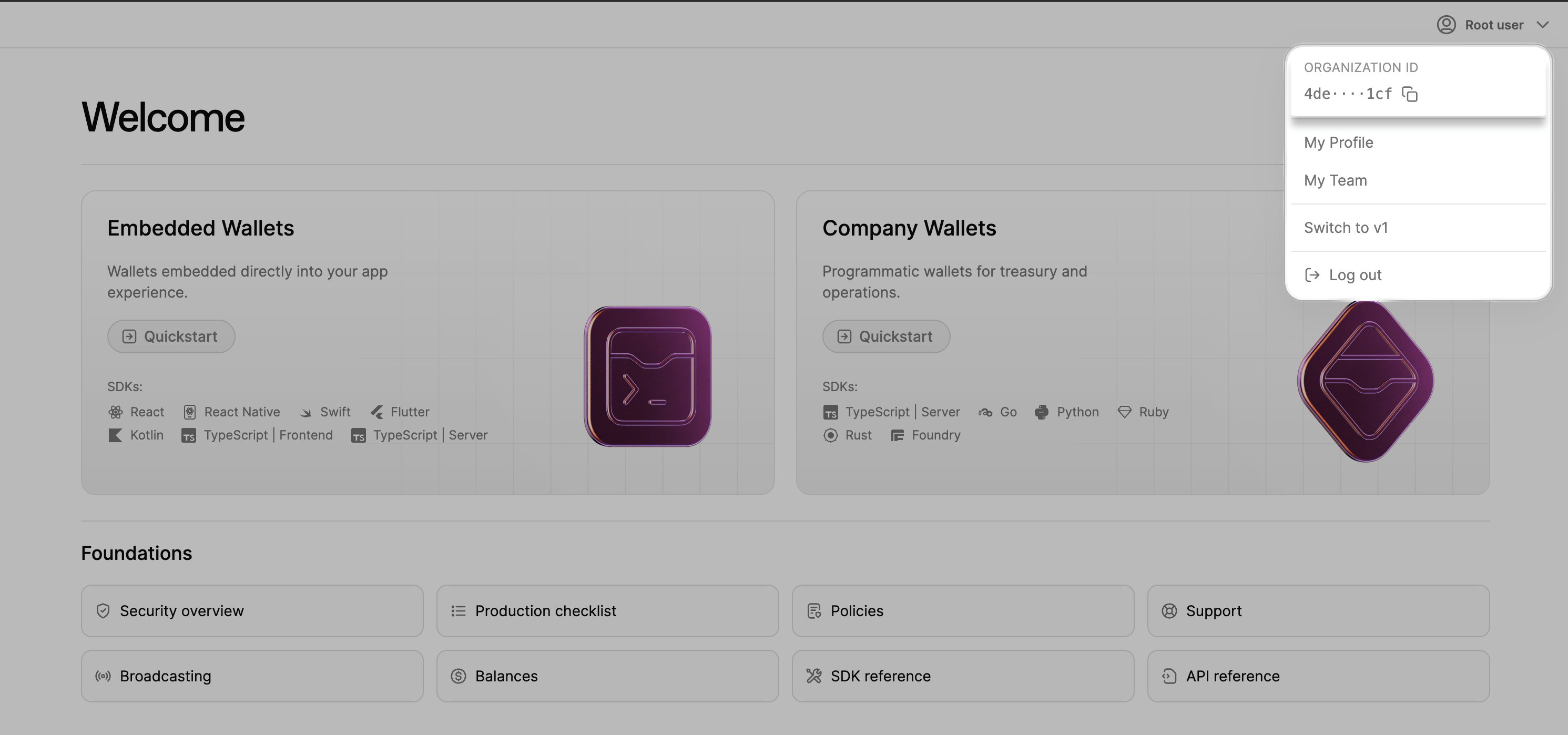 These will be used in the next steps to configure your app.
## Installation
You can use `turnkey_sdk_flutter` in any Flutter application.
If you're starting fresh, create a new Flutter app:
```bash theme={null}
flutter create my_turnkey_app
cd my_turnkey_app
```
Add the Turnkey Flutter SDK and supporting packages:
```bash dart theme={null}
flutter pub add turnkey_sdk_flutter provider flutter_inappwebview
```
## Provider
Wrap your app with `ChangeNotifierProvider` and configure `TurnkeyProvider`.
```dart lib/main.dart theme={null}
import 'package:flutter/material.dart';
import 'package:provider/provider.dart';
import 'package:turnkey_sdk_flutter/turnkey_sdk_flutter.dart';
final GlobalKey navigatorKey = GlobalKey();
void main() async {
WidgetsFlutterBinding.ensureInitialized();
// Optional: define some callbacks
void onSessionSelected(Session session) {
// Do something when the user logs in, e.g. navigate to home screen
}
void onSessionCleared(Session session) {
// Do something when the user logs out, e.g. navigate to login screen
}
void onInitialized(Object? error) {
// Do something when the SDK is initialized
}
final turnkeyProvider = TurnkeyProvider(
config: TurnkeyConfig(
authProxyConfigId: "",
organizationId: "",
// Optional: attach some callbacks
onSessionSelected: onSessionSelected,
onSessionCleared: onSessionCleared,
onInitialized: onInitialized,
),
);
runApp(
ChangeNotifierProvider(
create: (_) => turnkeyProvider,
child: const MyApp(),
),
);
}
class MyApp extends StatelessWidget {
const MyApp({super.key});
@override
Widget build(BuildContext context) {
return MaterialApp(
navigatorKey: navigatorKey,
title: 'My Turnkey App',
theme: ThemeData(useMaterial3: true),
home: const MyApp(), // Replace with your app's screen
);
}
}
```
## Optional: ready state & error surfacing
You can await `turnkeyProvider.ready` during startup to surface initialization errors to the user:
```dart theme={null}
turnkeyProvider.ready.then((_) {
debugPrint('Turnkey is ready');
}).catchError((error) {
debugPrint('Error during Turnkey initialization: $error');
// Show a snackbar/toast after the current frame
});
```
## Demo app
You can check out a complete demo app that uses Turnkey's Flutter SDK on [GitHub](https://github.com/tkhq/dart-sdk/tree/main/examples/flutter-demo-app). Feel free to clone and modify it to get started quickly!
These will be used in the next steps to configure your app.
## Installation
You can use `turnkey_sdk_flutter` in any Flutter application.
If you're starting fresh, create a new Flutter app:
```bash theme={null}
flutter create my_turnkey_app
cd my_turnkey_app
```
Add the Turnkey Flutter SDK and supporting packages:
```bash dart theme={null}
flutter pub add turnkey_sdk_flutter provider flutter_inappwebview
```
## Provider
Wrap your app with `ChangeNotifierProvider` and configure `TurnkeyProvider`.
```dart lib/main.dart theme={null}
import 'package:flutter/material.dart';
import 'package:provider/provider.dart';
import 'package:turnkey_sdk_flutter/turnkey_sdk_flutter.dart';
final GlobalKey navigatorKey = GlobalKey();
void main() async {
WidgetsFlutterBinding.ensureInitialized();
// Optional: define some callbacks
void onSessionSelected(Session session) {
// Do something when the user logs in, e.g. navigate to home screen
}
void onSessionCleared(Session session) {
// Do something when the user logs out, e.g. navigate to login screen
}
void onInitialized(Object? error) {
// Do something when the SDK is initialized
}
final turnkeyProvider = TurnkeyProvider(
config: TurnkeyConfig(
authProxyConfigId: "",
organizationId: "",
// Optional: attach some callbacks
onSessionSelected: onSessionSelected,
onSessionCleared: onSessionCleared,
onInitialized: onInitialized,
),
);
runApp(
ChangeNotifierProvider(
create: (_) => turnkeyProvider,
child: const MyApp(),
),
);
}
class MyApp extends StatelessWidget {
const MyApp({super.key});
@override
Widget build(BuildContext context) {
return MaterialApp(
navigatorKey: navigatorKey,
title: 'My Turnkey App',
theme: ThemeData(useMaterial3: true),
home: const MyApp(), // Replace with your app's screen
);
}
}
```
## Optional: ready state & error surfacing
You can await `turnkeyProvider.ready` during startup to surface initialization errors to the user:
```dart theme={null}
turnkeyProvider.ready.then((_) {
debugPrint('Turnkey is ready');
}).catchError((error) {
debugPrint('Error during Turnkey initialization: $error');
// Show a snackbar/toast after the current frame
});
```
## Demo app
You can check out a complete demo app that uses Turnkey's Flutter SDK on [GitHub](https://github.com/tkhq/dart-sdk/tree/main/examples/flutter-demo-app). Feel free to clone and modify it to get started quickly!
 ## Next steps
Ready to start building your app? Check out the **Authentication** guide to learn how to set up login/signup in your Flutter application.
## Next steps
Ready to start building your app? Check out the **Authentication** guide to learn how to set up login/signup in your Flutter application.